





PeptiCore guide
COA and Batch Documentation for Research-Use Products
Published by PeptiCore on 11 Jul 2026 · Last reviewed 13 Sept 2026
Quick answer
A catalog record identifies the SKU and format; a batch document reports results for a defined sample or batch. Match the product, specification, batch reference and date before comparing analytical results. A catalog link alone does not confirm a future shipment.
Key terms
| Term | What it means in this guide |
|---|---|
| Certificate of analysis (COA) | A document that reports identified analytical results and reference information for a defined record. |
| Batch identifier | The reference used to distinguish one documented batch or sample from another. |
| Document date | The issue or test date used to place the analytical record in its stated context. |
| Traceability chain | The connected product, SKU, batch, method, and result fields used to verify record identity. |
Documentation
A record you can review
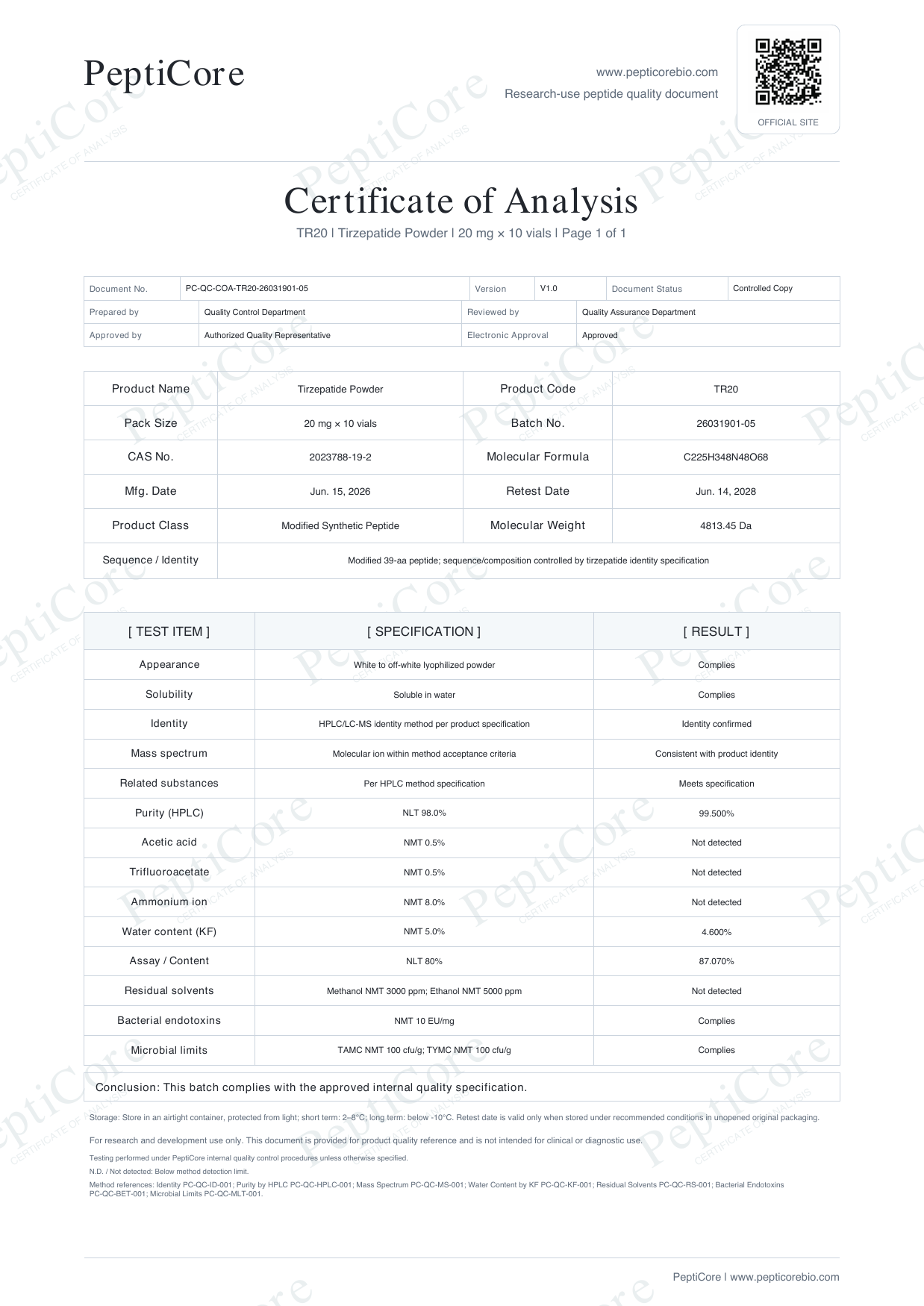
Tirzepatide · TR20 · 20 mg per vial · 10 vials per catalog pack
Open the existing catalog document to review its identifiers and stated results. This is a PeptiCore document example, not independent supplier certification or a promise about a future shipment.
Catalog and batch records
The catalog describes an available specification. A batch document describes an analytical record associated with a particular batch or documentation reference. Keep their identifiers distinct.
Core traceability fields
Review the product or series name, SKU or specification, batch identifier, document date, test references, and reported results. Missing or mismatched identifiers should be clarified before relying on the record.
Preview and request workflow
Where a COA preview is linked, open it from the specification context. For further documentation context, include the exact SKU in the structured inquiry.
Responsible interpretation
Documentation should be read within the scope stated on the record. Avoid extending an analytical result into claims that the document does not make.
Practical review checklist
- 1.Match the product name and SKU or specification.
- 2.Confirm the batch identifier and document date are present.
- 3.Identify the analytical method attached to each reported result.
- 4.Keep previews, series images, and batch records clearly distinguished.
- 5.Request clarification when identifiers are missing, inconsistent, or unreadable.
Common interpretation errors
Do not combine identifiers or results from separate documents. Batch, SKU, document date, and analytical fields should refer to the same record before comparison.
Frequently asked questions
What connects a COA to a catalog item?
Matching SKU or specification and batch/document identifiers provide the traceability context.
Is a series page a batch record?
No. It is a catalog overview that links to available documentation context.
How can I request documentation context?
Include the exact SKU in a PeptiCore inquiry after reviewing the available COA status.
Related product specifications
Continue reading
Catalog and documentation path
Use the catalog to identify an exact SKU, the Quality page to review documentation access, and the inquiry workflow to keep the selected record visible when requesting a final quote.
Sources and review references
These references explain methods and record-review terminology. They do not certify PeptiCore, validate a product batch, or establish a supplier relationship. Regulatory references describe their own application scope; linking them does not claim that PeptiCore holds an approval or certification. Documentation review policy.